




Introduction
Teaming up with a virtual assistant can transform the game for business, but it also means obligations. You are giving VAs sensitive material when you put them into emails, CRMs, financials, or even client files. Without virtual assistant data security, the risk of a breach, misuse, and exposure is heightened.
Data security isn’t just a defense of data; it’s about preserving the trust human beings place in other human beings. With the right software, effective onboarding, and clear guidelines in place, companies can protect their data while enjoying the productivity benefits that come with using a VA.
Data Security is Crucial with Virtual Assistants
You’ll want to keep your data secure when working with a virtual assistant. Some SMEs allow their VAs to use the systems containing sensitive personal data, e.g., CRMs, accounting packages, and client communication platforms. Users can be exposed to high risks unless adequate security mechanisms are implemented.
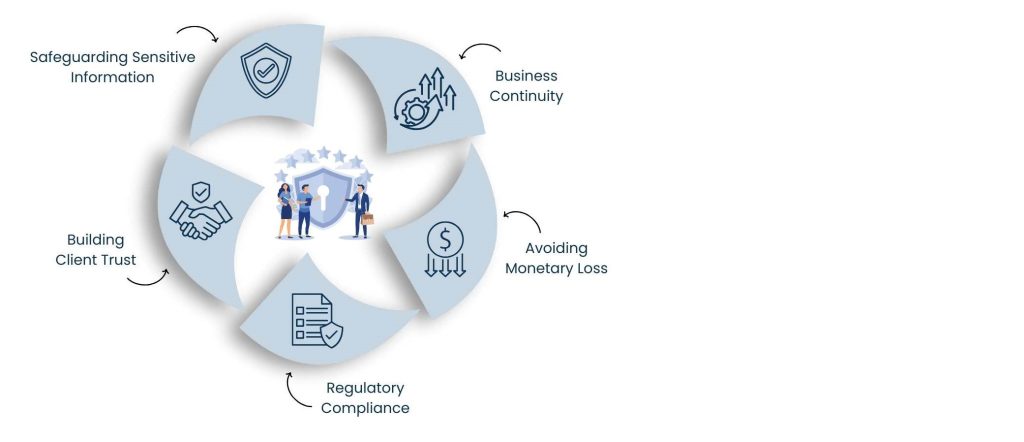
1. Safeguarding Sensitive Information
Whether it be financial records or customer databases, businesses are often centered around sensitive information. And when this information is mismanaged or compromised, the impact can be quite severe. In some cases, a leaked client list could strain relationships and provide a competitive edge to rivals. Security on that scale prevents these breaches.
2. Building Client Trust
Trust Is A Valuable Commodity In Business. As customers, you matter to us and we want you to feel secure that your personal as well as your business data is safe. When a VA evidences the safekeeping of information, it builds client rapport. By contrast, all it can take is a small breach to undermine years of trust.
3. Regulatory Compliance
There is high pressure for a lot of industries to stay compliant with their regulations. Financial institutions have PCI-DSS, healthcare has HIPAA, and companies doing business with the EU take customers have GDPR. A VA who doesn’t adhere to these can inadvertently be putting your business at risk of legal liabilities.
4. Avoiding Monetary Loss
Cyberattacks and data breaches can lead to financial loss in terms of lawsuits, fraud, or regulatory penalties. And even small businesses, it’s not necessarily safe — hackers go after them because they know security might be weaker. Good VA security measures can keep you from losing money.
5. Business Continuity
Unauthorized access or tampering with the data can bring operations to a standstill. By instituting secure VA platforms, companies reduce downtime and keep the work flowing with little interruption.
In the end, protecting your VA’s security with data privacy safeguards not only protects your business, but also you and its long-term growth. Learn more about our privacy policy that ensures our client that their sensitive information is in safe hands.
Also Read: Virtual Assistant Services in Montpellier
Common Security Problems with Digital Assistants
Virtual assistants provide flexibility and cost savings, but without security measures in place, they can also introduce risk into the company’s operations. Knowing about these risks allows organizations to create a defense.

Poor Password Practices
One of the biggest threats stems from weak password practices. When VAs use the same password as they do elsewhere or send their passwords via email, hackers can easily get through it. A weak or recycled password is one of the biggest weaknesses.
Unprotected End-Points
The majority of VAs are using their own laptops or devices to complete their work. If your devices lack antivirus software, encryption, and firewalls, then they become unprotected against cyber threats. Public Wi-Fi over an unsecured line is especially bad, as eavesdropping attackers can just snatch your data.
Unauthorized VA Access
VAs may have access privileges more than necessary, without role-based security controls. For example, assigning full admin rights to employees who only need user-level privileges makes it more likely that someone could accidentally misuse data — or worse.
Data Sharing Risks
The more data is transferred unencrypted through email or consumer messaging apps, the higher the risk it will be intercepted. Sensitive materials, such as contracts, invoices, or client information, should never be shared on anything but an encrypted platform.
Lack of Monitoring
Without logs and without someone watching, it might be too late before companies even notice that hackers are using their systems to hack others. It may be logins from strange locations, unauthorized downloads, or arbitrary file modifications.
Many of these hazards are preventable, given the proper systems. When you collaborate with the right Virtual Personal Assistant, your personal business data is safe and secure.
Data Security Best Practices for Virtual Assistants
Data does not get secured by magic, but it calls for an organized way. The best practices would govern VAs’ access, use, and protection of sensitive information.

Limit Access Via Role-based Permissions
VAs should only be able to access the files and tools that are required for their position. You can have role-based permissions on platforms such as Google Workspace and Microsoft 365. It reduces the risk of abuse, intentional or unintentional.
Use Secure Password Management
Services such as LastPass and 1Password let you share logins without sharing the actual password. This also has added security, and it can be simple to pass this access should the VA go away.
Enable Two-Factor Authentication (2FA)
2FA adds additional security by forcing the user to provide a second form of verification. Even if hackers steal your login, they still can’t get in without the second code.
Give Them Devices (If You Can)
Providing employees with company-issued laptops or tablets that are already set up with your IT security best practices ensures they’re being followed consistently. That even includes encrypted drives, updated antivirus programs, and limited installations.
Train VAs in Security Policies
Having the best tools the world has to offer is useless if a VA does not know how to use them. Training on VPN, awareness training for phishing, and reporting incidents will help VAs be proactive in protecting data.
Speak in Secure Forums
Do business communications via Slack, Microsoft Teams, or an encrypted email service by default. Keep business files separate from personal apps.
Monitoring and Audit Activity
Perform frequent audits via admin consoles along with dashboards to monitor how data is being accessed and used. Left unchecked, odd behavior results in true compromises – fast.
Your virtual assistants can work securely and productively with these best practices in place.
Also Read: eCommerce Consulting Services
The Tools That Will Improve Data Security for VAs
Technology, of course, is the foundation of data security today. The right tools can also guard sensitive data, even as they make sure that virtual assistants have what they need to get the job done.

Password Managers
Apps like LastPass or 1Password let companies securely store and share login details. It also means you don’t have to send a raw password in an email or chat. The liability from churn is to some extent controllable by immediately shutting them off.
VPNs
A Virtual Private Network (VPN) encrypts internet traffic, ensuring that it is not only more difficult for hackers to intercept data but also impossible to read on the journey. VAs connecting to public Wi-Fi or remote networks should always ride the secure tunnel of a VPN like NordVPN and Express VPN to protect sensitive sessions.
File Sharing Security
Most cloud-based file sharing channels, such as Dropbox/Google Drive, have rich permission modals around files. And you can also grant view-only permissions, or block downloads entirely, and have link life spans so that the most sensitive documents don’t circulate forever.
Collaboration Tools
Companies can use project management tools (such as Asana, Trello, or ClickUp) to assign and track tasks without passing out even more system credentials. (The peg without data access is clear.)
Monitoring Systems
Ninja One, Google Admin, and Microsoft Intune are platforms that can give information about what the device has been doing (activity), logins, and system usage. These monitoring systems enable companies to detect questionable conduct before it becomes a breach.
Discover more about how we customize secure VA workflows across industries on our Industries page. When these tools are used together, businesses establish layered security that provides data from multiple vantage points.
Draft a Data Security Policy for Virtual Assistants
Virtual assistant data security is the solid foundation for outsourcing operations. It establishes expectations, personal responsibility, and compliance with the law.

Security Rules
Set rules limiting what tools, files, and systems a VA has access to. Role-based controls would have to be coded in the policy to make sure that overexposure is avoided.
Device-Security Guidelines
Personal assistant devices must adhere to device-security requirements. This is a reference to antivirus protection, firewalls, and encrypted hard drives. For employer-issued devices, this should be IT enforcement.
Password and Authentication Policies
The company should mandate strong, unique passwords and 2FA for every account. There also needs to be requirements for forcing regular password changes.
Confidentiality Agreements (NDAs)
NDAs are legally binding agreements to protect sensitive business information from being shared outside the company. These forms should be signed by all VAs before they begin work.
Incident Reporting Procedures
VAs need to understand what to do if they see something that isn’t quite right and suspect a breach. Clear reporting lines mean that response time is minimized, as is the damage.
When rules are in writing and effectively communicated to others, it promotes a culture of making every person accountable for the results. They know the jobs they need done, and that there will be work to do for you, so responsibilities are clear and mutually respected.
Also Read: Virtual Assistant Services in Akranes
Advantages of a Secure Virtual Assistant with Data Security
Emphasizing security means so much more than just keeping your information safe.

Here are a few reasons why:
- Peace of Mind: Small company proprietors without worries regarding data mishandling. Instead of micromanaging, that confidence lets them grow.
- Corporate Image: Customers prefer to do business with organizations that have an appreciation for security. It demonstrates that you are professional and responsible when it comes to security.
- Lawful Guards: Put in place so that businesses don’t get fined, sued, or on the hook for fines because of misusing data.
- Force: Secure systems do not fail amidst incursions or exploitation. Rather than just reacting to crises, companies can remain in business-as-usual mode.
- VA Relationship Growing: The trust of the VA and business is reinforced through open security. When virtual assistants know what to expect and have confidence in the systems they use – well, things just run better, collaborations go smoother, and it’s easier to maintain long-term partnerships.
In conclusion, good security practices are good for everyone: the business, its clients, and the virtual assistant.
Conclusion
Data is one of your business’s most critical assets and should not always be an afterthought. While data protection might sometimes be breached as a result, priority implementation of virtual help, limited access, password protection, and secure communication are security patterns. Virtual assistant data security and further development help protect your sensitive information from breaches and reputational damage at the same time, while allowing your VA to perform efficiently.
At Task Expert, we take security seriously. Users have access to your virtual assistants, which implies that at the same time, we take very tough matters, working with users who are equal to the case, with you defending this information. With a little help and a lot of answers, you can stay safe even in the face of fear.
Protect your business before a breach happens. Contact Tasks experts today and secure your data with confidence.
Frequently Asked Questions
You can give access without sharing the real password using a service like LastPass.
Yes, VPNs protect data when it’s being transmitted through public or insecure Wi-Fi.
Yes, via admin tools, activity logs, or device management software.
Even if you’re intending to employ your VA staff, reputable houses like Tasks Expert make their VAs sign an NDA (non-disclosure agreement) before starting work.
Yes, but only if access is restricted, protected by 2FA, and kept under close watch.
About Us
Tasks Expert offers top-tier virtual assistant services from highly skilled professionals based in India. Our VAs handle a wide range of tasks, from part time personal assistant to specialized services like remote it support services, professional bookkeeping service etc. Furthermore, it helps businesses worldwide streamline operations and boost productivity.
Ready to elevate your business? Book a Call and let Tasks Expert take care of the rest.

About Author