Introduction
There are many different things to juggle while running a business, to name a few: Customers, Assignments, Deadlines, and ongoing contact. Virtual assistants can provide some assistance in this area with their expertise in using the best virtual Assistant tools. A VA can’t do it alone to have a real impact, and needs the right resources. Choose the right virtual assistant services, and you may be able to get boring work done faster and with less hassle, whether you’re a solo entrepreneur or managing a growing team.
This post will help you choose the best tools for your business model and make your VA work more efficiently and your business grow easily!
Why the Right Virtual Assistant Tools Matter
Companies of all kinds are using virtual assistants to help manage operations, speed up processes, and enhance productivity. Yet simply hiring a virtual assistant won’t cut through the clutter; having the right tools can also help boost accuracy and efficiency for anything from project management to customer communication automation. It will be hard to find the best solutions, though, when there are so many to pick from. You just need to make sure your toolkit is tailored to the way you do business, the ways you want to grow, and your business strategy.
Whether you run a lean start-up, an e-commerce business, or a service agency, a well-chosen set of tools will give your virtual assistant the power to operate at their best — and help your business scale more quickly. So, we will show you how to select the most effective virtual assistant tools to suit your process, how they will save you time, and ensure you deliver measurable value.
Step 1: Know Your Business Model and Primary Needs
Before choosing any virtual assistant tools, the most crucial step is to know your business model. This may sound obvious, but neglecting this step usually results in tool overload, mismatched subscriptions, and poor integration throughout your operations. When your business model is well defined, it becomes simpler to determine which tools are crucial and which are merely “nice to have.”

Begin by sketching out your core activities and workflows. Ask yourself the following questions:
- Do you interact with customers often, or do you receive much of their correspondence?
- Do you manage shipments, orders, or inventory?
- What type of business or industry are you in, and are you service- or product-focused?
- Are there multiple departments or team members that need to collaborate?
- Are your assignments more task-based, deadline-based, or campaign-based?
- Do you have any billable hours/performance stats to follow?
These questions will enable you to determine the kinds of tools that your virtual assistant will depend on daily.
For instance, a solopreneur consultant or coach might use these tools to maintain contact with clients:
- calendar scheduling tools (such as Calendly).
- CRM software (such as Zoho or Pipedrive).
- Video conferencing (such as Zoom or Google Meet).
In contrast, a real estate firm might need document management software such as Dropbox or Google Drive, Contract e-signature tools (such as DocuSign), and lead tracking software (such as HubSpot).
If you are operating an e-commerce store, your virtual assistant might require integrations with Shopify or WooCommerce, order and inventory tracking software, and a customer support tool like Gorgias or Zendesk.
A content marketing agency, on the other hand, will gain more from using Project management apps like Trello or ClickUp, Slack for team communication, Grammarly for writing quality, and Google Workspace for collaboration.
In step 2 above, we’ll break down the specific tool categories that would meet various business needs so you can have a framework to build a smart and scalable VA toolkit.
Also Read: KYC/AML Process Support
Step 2: Determine the Tool Categories You Require
Once you’ve mapped your business model, the next step is identifying the virtual assistant tools that fit your workflow. The right categories ensure your VA can manage tasks, communicate clearly, and stay aligned with your business goals.
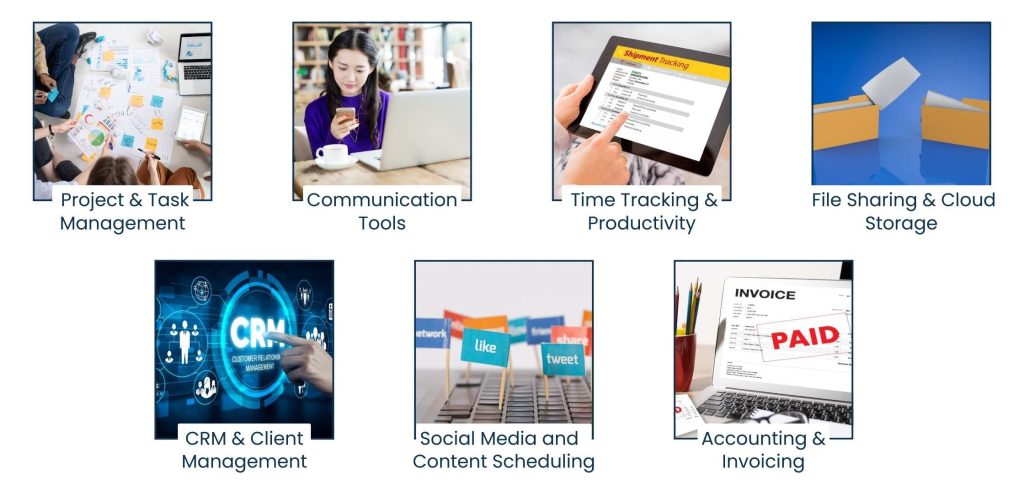
Here are the core tool types most businesses need:
1. Project & Task Management
Examples: Trello, Asana, ClickUp
Tasks like assigning work, setting deadlines, and keeping everyone in the loop need time and effort. Whether you are coordinating a marketing campaign, product creation, or internal functions, a project management system imposes order and responsibility. Virtual assistants can track their progress, collaborate within tasks, and see workflows visually. These tools also prevent lost deadlines and create more clarity across groups.
2. Communication Tools
Examples: Slack, Zoom, Microsoft Teams
Good communication is the foundation of any remote company. Such products allow your remote assistant to maintain real-time contact with you or a colleague, or even your clients. You might use chat for quick status updates, channels for topical conversations, and video meetings for team calls or customer meetings. Integrating these products can help alleviate email overload and improve reply times.
3. Time Tracking & Productivity
Examples include Toggl, Time Doctor, and Hubstaff.
In case your virtual assistant is on an hourly rate, or you want to allocate a time budget. These are tools to track how our time is being spent on particular projects or clients. You’ll get visibility into billable hours, productivity trends, and where you may be operating inefficient areas. And some implementations have activity snapshots, idle alerts, and body stats to promote accountability.
4. File Sharing & Cloud Storage
Examples: Google Drive, Dropbox, OneDrive
Also, VA may want to open or change documents or spreadsheets, videos, or marketing booklets pretty often. Cloud storage apps let you easily share and store files from any device. They allow version history, permissions, and backup in the event of data loss. The platforms also facilitate collaborating in real-time on shared documents, improving the synchronization of remote work.
5. CRM & Client Management
Examples: Zoho CRM, HubSpot, Salesforce
For lead-gen, follow-up sales, or client onboarding enterprises, CRMs are essential. They help Virtual Assistants keep up with contact information, deal stages, and auto follow-up. They used the customer’s behavior as input in order to communicate on a 1:1 basis. CRMs reduce the need for tedious admin work with strategic use and make it easy to scale and grow client relationships.
6. Social Media and Content Scheduling
Examples: Buffer, Hootsuite, Later
If content marketing is part of what your VA will manage, make sure they are familiar with scheduling tools. They allow VAs to schedule posts, report on stats, and control more than one account using a single dashboard. They also keep the brand looking consistent and save time on hand-posting. Good for companies running marketing campaigns across platforms such as Instagram, LinkedIn, Facebook or similar.
7. Accounting & Invoicing
Examples: FreshBooks, QuickBooks, Wave
With the proper accounting tools, managing invoices, expenses, and financial reports is a breeze. They enable so-called virtual assistants to send invoices, ‘receipt match’ transactions, or generate reports for bookkeeping or tax purposes. They are great for freelancers, agencies, and service-based businesses.
Step 3: Focus on Integration and Compatibility
One of the most underplayed but most important things to consider when choosing virtual assistant tools is how well they play together and with your existing systems. You may have the most feature-packed tools, but if they work alone, you’ll generate more friction than flow. What’s magical about a virtual assistant isn’t just what it can do, but how quietly it can be done, as part of an integrated, coherent tool stack.

Choose systems that have native integrations, or can integrate via API, with the other platforms you’re working with. For instance:
- ClickUp’s native integrations with Google Drive, Zoom, and Slack.
- It also has native integration, including Gmail, Outlook, and even software like QuickBooks.
- Notion is also compatible with GitHub, Figma, and Zapier for broader automation integrations.
- Seamless integration of FreshBooks with your payment processors, bank, or CRM.
Even better still, services such as Pabbly Connect, Make (ex Integromat), and Zapier give us the glue to connect products beyond direct integration. You can automate elements in your project, e.g,
- If a client books an appointment with you through Calendly, create a Trello card.
- When you mark an invoice as paid in QuickBooks, update the client’s status in your CRM.
- Auto-send a welcome email when a new lead signs up through a web form.
Believe me, these are not just time-saving hacks — they are how you build a system so that your virtual assistant can work like a machine in full speed without the distraction of dealing with repetitive or isolated tools.
Pro tip: Instead of diving into a tool, check to see what’s supported on the integrations page for that app or review what’s listed in Zapier’s app directory. Choose tools that fit with your ecosystem, not the other way around.
Step 4: Consider Scalability and User Access
As your business grows, the headcount of your team and the work grow too. Here, the tools provided are what power it all. If one solo virtual assistant is “good enough” for you now, it may not be good enough when you have five, ten, or twenty staff members. That’s why it’s so crucial that the virtual assistant tools you choose to embrace scale with your company without requiring you to reboot on new platforms or over-provision into expensive enterprise tiers long before you’ve outgrown them.

When considering the scale-impact tools, here is what you should ask:
- Multi-user support: Your tools should allow you to add users without hitting caps or paying outrageous fees. Look for options that allow you to scale gradually with team-based pricing.
- Access Control and Permissions: Most useful when you are delegating tasks or working with sensitive data. Are you able to define user roles, lock down access to certain folders or dashboards, or monitor changes?
- Admin panels and audit trails: You’ll want to track who’s doing what and when, so admin panels and audit trails will be needed to track it all. Platforms like ClickUp, Notion, or Monday. com has loads of admin features to allow you to keep control.
- Customer support & onboarding materials: As your user base grows, so do your training, documentation, and support needs. Go for far-reaching help centers or an assigned account manager, or live chat.
Short answer: Don’t just think about what you need today; think about what you will need in six months or a year. The best tools are not convenient–they are future-proof, confidence-inspiring to expand limitlessly.
Step 5: Don’t Overwhelm – Just Take What You Need
In an attempt to get more done, entrepreneurs have many virtual assistant tools. With hundreds of software solutions on the market, each claiming to solve specific productivity issues or communications, it’s easy to get lost in the noise.
Having a small, functional tool set. Start with a list of the bare-bones core tasks that your VA will handle — maybe that’s project tracking, timekeeping, file sharing, or client correspondence.

The following are things to keep in mind as you’re building your toolkit:
- Does this device solve a problem, or just make the system more complicated? If it does not cure a real need or if it does not automate a process, it can be missed.
- Is the software easy to learn and use for your VA? Such a high learning curve leads to longer learning times and less productive work.
- Can you quantify ROI? Do you find it difficult to measure ROI (return on investment)? The tools should save you time, increase output, or improve quality. If the benefit ultimately can’t be measured, think again.
- Are you replicating a tool that can do that? Look for overlap. You may already have a tool that performs this type of function, or which could be upgraded to enable such a use.
Pro tip: Do a quarterly tool audit. Re-evaluate what tools you’re using, how much you’re using them, and whether they’re helping or hindering your operation.
At the most basic level, simplicity scales. Choose virtual assistant software that is specifically designed to facilitate your goals, is easy to use, and allows for productivity, not confusion. A minimalist toolkit empowers your VA to do strong work — and saves your business time, money, and energy.
Also Read: NFT Listing & Management
Bonus: Example tool stack for various business categories
Your niche chooses your toolset. So here’s a stack I’ve compiled for a couple of different business models to help keep your virtual assistant(s) successful, organized, and efficient.
1. Content Agency
- Trello (project management) uses visual boards for campaigns, blog pipelines, and the editorial calendar. It allows the VA to track deadlines, assign tasks, and collaborate in real time.
- Slack Communication: Communication is streamlined with teams, writers, clients, etc. It is perfect for those quick updates, links, and feedback exchanges that you don’t want to clog up your email.
- Grammarly (content editor): Grammarly makes all your content perfect and error-free. It is a necessity for editing blogs, social posts, and emails before you send them.
- Google Drive (File Sharing) Google Drive is a single place to store, create, share, and keep all your stuff. Shared Content and Client Folders: VAs find it easy to look after shared content folders and client files.
2. E-commerce Brand
- Shopify (Store management): Shopify is where decisions about the online store are made, and your VA uses it to make product updates, process orders, and manage performance. It’s the nerve center for inventory and sales.
- Gorgias (Customer Success): Gorgias helps you respond to customer questions and refunds over multiple channels, like tickets and chat. Your VA can also use it to respond quickly and professionally.
- Google Sheets (inventory tracking): Google Sheets provides an easy-to-edit way to enter inventory, prices, or inventory restock schedules. It’s also useful for creating performance reports and sales logs.
- QuickBooks (accounting): QuickBooks can help your VA manage basic bookkeeping tasks such as invoicing, tracking expenses, and reconciling accounts. It’s simplified financial management for your business and tax-friendly.
3. Real Estate

- HubSpot CRM (lead tracking): Hook up your VA with HubSpot so they can track leads, stage deals, and automate follow-ups. It rules out the possibility of any opportunity falling “through the cracks.”
- Calendly (schedule appointments): Calendly streamlines scheduling by giving clients the ability to book calls from your open time blocks. No more back-and-forth emails, and a nice, clean calendar.
- Zoom (virtual meetings): With Zoom, video meetings are quick and simple, whether you’re connecting with buyers, sellers, or your internal team. Your VA arranges, hosts, and saves your sessions for its clients.
- Dropbox (for document storage): Keep your property documents, contracts, and legal forms in a Dropbox. It provides secure and convenient storage for your confidential files.
Conclusion
The key to picking the right virtual assistant tools isn’t just about technology—it’s strategic. Your selected tools should greatly dictate how smoothly your virtual assistant works, how smoothly your operations are, and how scalable your business is in the long run. Instead of chasing after every hot new app or feature, the goal is to select tools that align with your business model and average workday.
Integration and automation are not formalities—they’re necessities in the virtual office today. You save time and reduce errors, and you get far more done when your VA doesn’t have to switch from one job to the next by changing from one different, stand-alone platform to another.
Scalability also serves as one of the foundations of smart tool selection. Think beyond your present size and build for growth. Avoid all of the key tools that will limit your flexibility or worse, have you switching platforms just a few months down the line.
Our virtual assistants at Tasks Expert are trained in these tools to optimize operations for a variety of sectors. Get in touch with us now for access to a premium VA who can transform your business.
About Us
Tasks Expert offers top-tier virtual assistant services from highly skilled professionals based in India. Our VAs handle a wide range of tasks, from part time personal assistant to specialized services like remote it support services, professional bookkeeping service etc. Furthermore, it helps businesses worldwide streamline operations and boost productivity.
Ready to elevate your business? Book a Call and let Tasks Expert take care of the rest.

About Author

Gary Katz
Related Blogs